Wednesday, June 12, 2013
Assassins Creed III Game Review


 |
| Haytham Kenway & Charles Lee |
 |
| Assasins Creed 3 Enviornment |
 |
| Naval Combat Gameplay |
Sounds: 10/10
Environments: 10/10
Gameplay: 9/10
Overall: 9/10
Guys! You can follow me at Somik Sharma

Friday, May 31, 2013
Seagate Momentus� XT Solid State Hybrid Drives Review
Seagate Momentus® XT Solid State Hybrid Drives Review

500, 320 and 250GB hard drive • 4GB solid state memory • 7200 RPM • 32MB cache • SATA 3Gb/s with NCQ
Here are the model key for the 3 different capacities of the Seagate Momentus® XT Solid State Hybrid Drives :-
500GB - Model ST95005620AS
320GB - Model ST93205620AS
250GB - Model ST92505610AS

Key Advantages of Seagate Momentus® XT Solid State Hybrid Drives
- Solid state hybrid drive delivers SSD-like performance with hard drive capacity options.
- Adaptive Memory™ technology customizes performance by aligning to user needs for overall improved system response.
- 80 percent faster performance than traditional 7200-RPM drives in PCMark Vantage benchmark scores
- Low heat and vibration—quiet operation without giving up storage capacity and affordability
- OS- and application-independent—designed for any SATA standard laptop PC
- Seagate® 5-Year Limited Warranty

- High-end laptops and workstations
- High-performance gamer laptops
- Fast external enclosures: USB 3.0, eSATA
- Small form factor PCs
Momentus® XT Solid State Hybrid Drives
- Higher productivity – less wait time
- Up to 50% faster boot-up speed*
- Twice the overall performance*
- Seagate® 5-year Limited Warranty
Seagate Momentus® XT Solid State Hybrid Drives are the Ideal solutions for:
- Mainstream and high performance laptops
- Gaming laptops and desktops
- Fast external enclosures: USB 3.0, eSATA
- Small form factor PCs
Get SSD-like-Performance Today
The Seagate® Momentus® XT drive is a solid state hybrid with Seagate® Adaptive Memory™, enabling the drive to deliver SSD-like performance along with higher capacity. Designed with high-performance core components on an innovative platform, the Momentus XT solid state hybrid drive consists of a 7200-RPM hard drive with 32MB of cache, 4GB of solid state SLC NAND flash storage and Adaptive Memory technology.
Higher Productivity - Less Wait Time
Adaptive Memory technology intelligently monitors your frequently used applications and data files, then places them into the solid state portion of the drive so they can be quickly recalled.
The Seagate Momentus® XT drive offers hybrid storage with Adaptive Memory technology, enabling the drive to deliver higher capacities up to 500GB and SSD-like performance. The Momentus XT drive is designed for all standard laptop PCs and is OS-, driver- and softwareindependent, making this drive easy to integrate and easy to use. Adaptive Memory technology enables the drive to tailor its performance to the user. Whether you are gaming, editing digital media or crunching numbers, the performance is optimized and ready for your next move.
Adaptive Memory technology is a Seagate data management technique that constantly monitors and quickly recalls data usage and preferences. It places files and data that the user will likely access again and again into the solid state portion of the drive. When the user requires the data or application fi le, it already sits
in an instantly accessible location, thereby customizing system performance for the user. Constant monitoring dynamically improves overall response time based on personal usage. You can perform at your best no matter how you use your laptop PC.

The Seagate Advantage
Seagate has a proven record of innovation and is the first drive manufacturer to deliver a solid state hybrid drive that self-tunes its performance so that frequently used data and applications are immediately accessible. Seagate continues to lead the industry in driving extreme performance and capacity at prices anyone can afford.
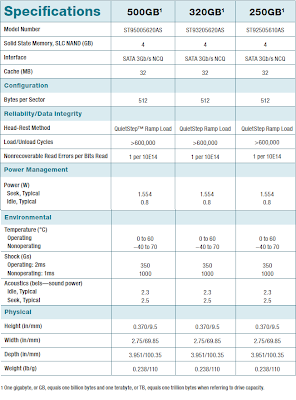
Below is the specifications of the 500GB Seagate Momentus® XT Solid State Hybrid Drive. You can look at the specifications of the other capacities in the picture after it.
Momentus® XT 3Gb/s 500GB Hard Drive
ST95005620AS
Specifications
Model Number : ST95005620AS
Interface : SATA 3Gb/s
Cache : 32MB
Capacity : 500GB
Areal density (avg) : 394Gb/in2
Guaranteed Sectors : 976,773,168
PHYSICAL
Height : 9.5mm (0.370 in)
Width : 69.85mm (2.75 in)
Length : 100.35mm (3.951 in)
Weight (typical) : 110g (.238 lb)
PERFORMANCE
Spin Speed (RPM) : 7200 RPM
Average latency : 4.17ms
Random read seek time : 11ms
Random write seek time : 13ms
I/O data transfer rate : 300MB/s
Unrecoverable read errors : 1 in (10 to the power of 14)
RELIABILITY
Annual Failure Rate : 0.5%
POWER
5V start max current : 1.0A
Average idle power : 0.8W
Average operating power : 1.1W
Average seek power : 2.2W
ENVIRONMENT
Ambient Temperature
Operating : 0°–60°C
Non-operating : -40°–70°C
Maximum operating temperature change : 20°C per hour
Maximum nonoperating temperature change : 35°C per hour
Shock
Operating Shock (max) : 350 Gs for 2ms
Nonoperating Shock (max) : 900 Gs for 1ms
ACOUSTICS
Acoustics (Idle Volume) : 2.3 bels
Acoustics (Seek Volume) : 2.6 bels
Features
Storage Type : Solid State Hybrid
*Performance may vary depending on users hardware configuration and operating system. Test results based on comparison with standard 5400-RPM hard disk drive (HDD) using Windows 7 and PCMark Vantage benchmark analysis.
Wednesday, May 29, 2013
Apple iPhone CDMA Review Price and Specification

Apple announced the iPhone launch CDMA by Verizon in the U.S. Tuesday, January 11. Now, Apple plans to launch the iPhone in the Asian market as well. Verizon CDMA iPhone is not proprietary. This means that Apple may partner with other companies in the United States and elsewhere to launch the CDMA iPhone. iPhone CDMA Price available at $199 for the 16GB device and $299 for the 32GB device with a two-year contract.
Currently, the iPhone is available in India via Bharti Airtel and Vodafone, who are stuck in a GSM version. When you launch a CDMA iPhone users can access the sake of clarity and services. Apple could start a CDMA iPhone in India through Reliance Communications and Tata DoCoMo half of 2011. Most mobile users around the world consider the Apple iPhone the best smartphone on the market. It plays an important role in the handset market. But with the emergence of smartphones with different operating system Googles Android, iPhones have lost their market value. According to a recent study by market Android phones to come from sales of iPhones in last quarter of 2010.
Apple iPhone CDMA Specification:
- Phone Model = iPhone 4 CDMA
- Screen Size = 3.5 inches, LED-backlit IPS TFT, capacitive touchscreen, 16M colors
- Camera = 5.0 Mega Pixels with resolution of 2592 x 1944 Pixels
- Digital Zoom = Yes
- Auto Focus = Supported
- Camera Flash = Yes
- Video Recording = Yes ( good video recording )
- 3G Enabled = Yes
- WLan Feature = Yes
- Frequency Range = CDMA 800 / 1900 / CDMA2000 1xEV-DO Mhz
- Phone Dimensions = 115.2×58.6×9.3 MM
- Phone weight = 137 G
- Battery = 1420 mAH
- Games = Supported
- MP3 Ringtones = Supported
- USB Charging = Supported
- Smart Phone = Yes
- Phone Processor Type = 1 GHz Apple A4
- Operating System = iOS 4.2.5
- Internal Memory = 16/32 GB storage, 512 MB RAMTouch Screen = Yes, Capacitive Touch Screen
- Display Size = Apple iPhone 4 CDMA has a display size of 640 x 960 px
- Display Features = Scratch-resistant oleophobic surface, Multi-touch input method
- Sensors = Accelerometer sensor for UI auto-rotate, Proximity sensor for auto turn-off, Digital compass, Three-axis gyro sensor
- Video Resolution = Yes, 720p@30fps, LED video light, geo-tagging
- Video Player = Yes, Multi Format Video Player
- Camera Features = Touch focus, geo-tagging, Secondary Camera
- GPS = Yes, with A-GPS support
- Wirless Protocol = Yes, Wi-Fi 802.11 b/g/n
- Special Features =Verizon 3G Mobile Hotspot, Scratch-resistant glass back panel, Active noise cancellation with dedicated mic, TV-out
- Colours=Black, White
Ainol V5000HDG Full HD PMP Review Price and Feature

Ainol PMP V5000HDG HD price available at about $ 119.99 and Ownta online store offers a price range around $ 95.50. So youre going to save up to 20%, or $ 24.49. The battery Ainol V5000HDG portable media player offers hours of battery life.
Ainol V5000HDG Full HD PMP Features:
- 5.0 inches of touchscreen display
- 800 x 480 pixel of screen resolution
- 8GB of internal memory storage space
- Photo viewer
- Integrated FM radio facility
- Up to 1280p Full HD video playback
- Voice recording facility
- Text reader
- Micro SD card slot
- USB 2.0 port, an HDMI port
Review Zepto Orion A15

Yet another laptop from Zepto named after a Greek mythology character. Orion A15 was named after the skilled hunter occupying a place in the stars after his death, and this idea is represented by the black laptop model with a stylish finish sporting an illuminated Ze[to logo on the back.
This 15.4-inch model is powered by the Intel Centrino 2 technology with minimum 3MB Smart Cache and 1066Mhz Front SideBus, which work together to deliver high operating speeds at a lower power consumption.
It integrates the Intel GMA 4500MHD graphics chipset with 384MB shared memory, DirectX 10 support, OpenGL 2.0 and Shader Model 4, for great views during gaming and while playing with the Windows Vista Aero feature on the 1280 x 800-pixel display.
Like the latest models introduced by Zepto, Orion A15 has the Night LED mode that allows you to turn off all the other indicators, leaving only the hard drive light On, for a simpler way of knowing when the portable computer is functioning.
Specifications include 8Gb maximum system memory, 2.8GHz Dual Core CPU speeds, TV Tuner, Turbo Memory Crad, Wireless LAN, 3.8 hours of battery life, built-in web camera, microphone, HDMI connectivity, SPDIF audio out, http://www.ubuntu.com/ Linux Ubuntu support, and other cool elements, encased in durable yet elegant aluminum reinforced chassis.
For a price of £517.10 Zepto offers the lower cost configuration with an Intel Core 2 Duo T5750 processor clocked at 2GHz, 80GB S-ATA hard drive storage capacity, DVD burner, Bluetooth 2.0+EDT, and built-in microphone. At £752.41 the notebook has 4GB memory, 320GB hard drive, DVD burner, Bluetooth 2.0+EDR, microphone and Windows Vista Home Basic operating system pre-installed. This one is powered by the Intel Core 2 Duo P7350 providing speeds of up to o 2GHz.
Asus Eee Pad SL101 Review

Design
Eee Pad Slider has the dimensions 10, 7 x 7.1 x 0.7 inches (with a retractable keyboard) and weighs 953 grams, bigger and heavier than the Samsung Galaxy Tab 10.1 (9.7 x 6.7 x 0, 3 inches, 565gram) and the Eee Pad Transformer (10.7 x 6.9 x 0.5 inches, 680gram). However, with the dock attached keyboar, Transformer much weight is 1.27 Kg.
Eee Pad Slider SL101 has a touchscreen surface is smooth and unusually thick panels are black with the sides curved gray. Size of the panel on each side is 1 inch and 0.9 inch at the top and bottom of the screen, looks bigger than the Samsung Galaxy Tab 10.1 (0.6 inches). However, this provides extra space for a wider keyboard. The back surface of a very grippable plastic coated, plastic with soft touch plastic with a gray accent lines give this device an attractive two-tone appearance.
By inserting a finger in between two layers of the casing (on the front-facing webcam) and push up, you can flip Eee Pad SL101 Slider sliding mode. In this mode, the screen is at a 45 degree angle, exposing a full QWERTY keyboard that has a soft material. Sliding keyboard device requires you to take and hold it with two hands, but quite smooth sliding motion. Coupled with a very sturdy hinge.
Keyboard
Eee Pad Slider SL101 has a QWERTY keyboard complete with buttons, including a special line number, the arrow keys, buttons khusu for Home, functions Back, Menu and Search.
Although you can use the arrow keys to navigate around the desktop and select the icon, but most will use your finger to launch applications. Unfortunately, Asus Android tablet does not include a pointing stick in the middle of the keyboard, although you can add an external mouse if you want this tablet works like a regular laptop.
Although you can type with accuracy a large and comfortable compared with the virtual keyboard, but the keys on the Eee Pad Slider SL101 keyboard is smaller than netbooks in general. So a little bit uncomfortable when typing a long period of time.
Eee Pad Slider SL101 also comes with two pre-loaded virtual keyboard, the keyboard and the keyboard of the Asus Android itself. We suggest you use the keyboard for the Asus numbers and letters placed on the same screen, giving the other symbols and even offer a similar fashion with Swype trail.
Unfortunately, as with Swype, a predictive capability is very limited footprint mode. Both Asus and Android keyboard supports haptic feedback.
Ports and Buttons
Asus Eee Pad Slider SL101 has multiple ports that are useful and you will not find on other Android tablet. On the right side there are some USB ports that you can use to install the USB Flash Disk, external hard disk, keyboard or mouse. At the top there is a mini HDMI port for connecting to a TV or external monitor and docking connector proprietary should you use to connect to an AC adapter for charging or PC to copy the file. The left side there is a microSD card reader, a special reset button, volume and power buttons.
When you attach an external USB mouse into the USB port, the pointer will appear and you can move around the Android 3.2 UI with very Mudan and click on the icon as if it were a desktop operating system. But you will see more and more when you use a wireless mouse.
Thats my review about Asus Eee Pad Slider review. How your opinion?
Sony VAIO S132GX B Notebook Review Price and Specification

Sony has released a new series of Vaio notebook Sony VAIO S132GX / B Sony VAIO S132GX / B notebook PC is connected to a number of advanced features, such as the display 13.3-inch LED-backlit 1366 x 768 pixels screen resolution and a 2.53 GHz Intel Core Dual Core 380 i3. Windows 7 pre-installed Home Premium operating system of the new Sony VAIO S132GX / B Notebook PC is built into Microsoft Office 2010. High Definition Audio will also Sony VAIO S132GX / B notebook.
Sony VAIO S132GX / B Notebook is price available at around $ 968.99 in the market.. Weighing 4.4 pounds this new Sony VAIO S132GX / B Notebook is available in black. Lithium Ion 5000 mAh Sony VAIO S132GX / B notebook offers long hours of battery life. Stay tuned for more details on the latest gadgets, Apple, and Internet.
Sony VAIO S132GX/B Notebook Specification:
- 13.3 inches of LED backlight display screen
- 1366 x 768 pixel of screen resolution
- Intel HD Graphics Dynamic Video Memory Technology 5.0
- Windows 7 Home Premium operating system
- 2 ( 0 ) x memory , 1 ( 1 ) x ExpressCard/34 expansion sdlot
- 2.53 GHz Intel Core i3 380M Dual Core processor
- 1066 MHz 4 GB / 8 GB (max) DDR3 RAM
- Microsoft Office 2010
- 320 GB of hard disk drive
- Bluetooth 2.1 EDR connectivity
- High definition audio
- Lithium ion 5000 mAh battery
- 4.4 lbs of weight
- Electro static touchpad
Tuesday, May 28, 2013
Targus Spruce EcoSmart Laptop Backpacks Review
Targus Spruce EcoSmart Laptop Backpacks Review
Author: laptop backpacks Targus is known for making great bags, and the Targus Spruce EcoSmart Backpacks do not fall short! The Targus Spruce Backpack is part of Targus EcoSmart backpack line. The EcoSmart line is made entirely of recycled plastic bottles. Not only does it have many different pockets, all of them have great depth. The back panel is cushioned so it absorbs shock and allows for a more comfortable fit. The Spruce backpack shows the green stitchings which set the backpack apart from others — a techie fashion statement, if you will. Also, it has three circle-shaped designs which add to the backpacks style. Green is a major theme, no doubt, since green is an "eco-friendly" color. The colors give the backpack a sleek yet sophisticated look that anyone would love.
 Main Compartments:
The Spruce backpacks have the standard two pen loops, zippered pouch, and a key clip. Additionally, it contains a business card holder, so you can always give your business cards out. In the other two main compartments are a large area for books, notebooks, or whatever you would like to fit in. In the second compartment, there is a laptop compartment and another area where you can add a few more books or notebooks. The laptop compartment is such that a 15 inch MacBook Pro fits snuggly, so its more likely to accommodate smaller laptops. The Spruce backpack also has a pocket on the outside, so you are able to put something into your backpack quickly.
Straps and Zippers:
Everyone knows that comfortable straps on a backpack are nice and, fortunately, the Spruce backpack has that in spades. There are many straps which allow you to get a personalized custom fit. When you put the Spruce backpack on, you are greeted by the comfortable straps. The right hand strap is equipped with a headphone holder, so you can wrap up our headphones when you are not using them. Also, the back panel is cushioned, so it absorbs some shock, and helps keep your laptop and other items safe. The Spruce EcoSmart Backpack is not as comfortable as backpacks such as Swiss, but it does a pretty good job. Though they pull gracefully but, the zippers on the Spruce backpack are solid so, unlike some backpacks, you do not need to worry about accidentally pulling them off.
Outside Compartments & Miscellaneous Compartments:
The Spruce EcoSmart backpack sports a water bottle holder and a MP3 player holder. The water bottle holder fits any regular sized bottle and you can even get a canteen to be even more eco friendly. A neat feature about the Spruce EcoSmart backpack is the MP3 player holder. While youre walking across campus or walking to the coffee shop, you can plug in your MP3 player, feed the headphones through, and your ready to rock and roll. Also, when youre done listening to your music, you can coil the headphones wires around the right hand strap and unwrap the headphones when you want to listen again.
Conclusion:
If your looking for a durable, stylish, usable laptop backpacks that will not break the bank, the Targus Spruce EcoSmart Backpack is definitely a contender. In my opinion, this backpack would be perfect for a college student who does not carry too many books, though it can fit a respective amount, and who needs to carry his laptop around. I enjoyed reviewing the Targus Spruce EcoSmart Backpack and I look forward to see what else Targus releases in its EcoSmart line.
Article Source: http://www.articlesbase.com/laptops-articles/targus-spruce-ecosmart-laptop-backpacks-review-5286751.html
About the Author
laptop backpacks & laptop bags wholesale
Review Toshiba Satellite Pro L300


Our Toshiba review unit had the following specifications:
- Intel Core 2 Duo T8100 2.1GHz processor
- Intel X3100 Integrated Graphics
- 2GB RAM DDR2
- 160GB (5400 rpm) hard drive
- Windows XP Professional OS
- 15.4" WXGA 1280x800 screen
- Intel PRO/Wireless 3945ABG (802.11a/b/g)
- 10/100 Ethernet LAN
- Modem port
- VGA-15 pin
- DVD-SuperMulti drive (+/-R double layer) supporting up to 11 formats
- ExpressCard Slot
- SDCard Slot
- 3x USB 2.0
- Headphone and microphone jack
- webcam
- Battery: 6-cell (4800mAh) Lithium Ion battery
- Weight: 5.7lbs
- Starting price: $949
Pros
- Solid design and chassis
- Great keyboard
- Nice screen
- Good array of ports and has optical drive
Cons
- A little on the heavy side
- The touchpad has slow response time
- Simple and plain design (some users like this though)
Review Asus A43SJ cheap laptop for gamers
Specifications:

- Asus A43SJ - VX223D
- B940 Intel 2.0Ghz
- 2GB DDR3, 320GB
- 512MB DDR3 Nvidia GT520
- Patriot 2GB Ram + 10 600 cl9 pc 2GB DDR3
- 14 "1366x768
- 320GB
- DOS Windows 7 64-bit
- Good performance from both the cpu and gpu
- Prices are economical, and 2-year warranty from Asus.
- Drivers from Asus that already autorun and one click installation (nice).
- Low power consumption.
- Temperature decreases rather than his brother, the point of this laptop is more cool
- A large size charger, but not accompanied by a short length of cable charger.
- Speaker sound could be categorized as ugly as though using the Altec Lansing and Realtek hardware as software, but can already use X-Fi diakalin modded.
- There is one shortcoming, namely in terms of hardware, where the dvd was a little error, sometimes must be opened using the eject in OS, the open button on the dvd is less responsive
Monday, May 27, 2013
Review Electrovaya Scribbler SC 3100
![[Electrovaya+Scribbler+SC+3100.jpg]](https://blogger.googleusercontent.com/img/b/R29vZ2xl/AVvXsEiUot3YCSksKH36O_3reOofEjo4vCp_2nrI29o1-9JXN4oEwh4ltf7g_MtzDGeq64ovqEd2hM5uItrX1MXPKrIcjwf8yfKKgqYXg-jktuO6yQm6e6Fim9e-bmNaxUps4eN1ixSlEicxonRs/s1600/Electrovaya+Scribbler+SC+3100.jpg)
Introducing to you the new world of laptop in which the battery is given the utmost importance. The Electrovaya Scribbler Tablet PCs are very much reliable for the ultra portability. The patented Lithium Ion Super Polymer battery technology makes these laptops have a competitive edge over others. Out of many tablet PCs of this company, the good model that is available to the users is the Electrovaya Scribbler SC 3100. The best feature of this laptop is patented and the uniqueness is maintained maintaining their standard in the laptop market.
Design
The tablet is always known for its ultra portability. The color is classy and the design is not gaudy. Many tablets fail in the designing part and Electrovaya is trying to be exception. The shiny and glossy finish of the sides of the tablet makes it a piece of pride too. Carrying a tablet PC will give confidence as it is mobile. Carrying an Electrovaya Scribbler SC 3100 will be known for its sleek style. The bright and large display screens, the built in capabilities like network connectivity, light sensor and digitizer add to the designing expertise.
Performance
The performance needs much appreciation. The Electrovaya Scribbler is known for longer battery life with the unique battery technology. The patented battery technology yields a longer runtime than any other. The Electrovaya Scribbler Tablet PC, SC 3100 is integrated with Intel Centrino ultra low voltage processor and it allows for the efficient power consumption. Also the model provides high capacity of hard disk where random access memory is enormous with space for extending memory. There are quite a good number of ports to allow the user to access all kinds of accessories and peripherals. Fingerprint recognition is available for security.
Pros and Cons
While this laptop market has the great battery for the longer runtime, the enormous space in hard disk as advantages, the other technological advances are lacking.
HP Pavilion Slimline s5730f Desktop Review Price and Specification

HP has unveiled a new series Pavilion Desktop, called the HP Pavilion Slimline s5730f. HP Pavilion Slimline s5730f Desktop is about a lot of wonderful features, including AMD Phenom II 511 Dual Core, NVIDIA Quadro NVS 3100M graphics processor with up to 1919MB of video memory. 7 preinstalled Genuine Windows Home Premium 64-bit system, this HP Pavilion Slimline s5730f Desktop also has a 802.11b / g wireless LAN connectivity. Microsoft Office 2010 has built-in HP Pavilion Slimline s5730f Desktop and 6-in-1 card reader.
HP Pavilion Slimline s5730f Desktop is priced at around $ 477.54. Weighing 12 pounds the new HP Pavilion Slimline s5730f Desktop will be available shortly. One year warranty comes with this desktop computer HP Pavilion Slimline s5730f. Stay tuned for more information about the latest gadgets, Apple, and Internet.
HP Pavilion Slimline s5730f Desktop Specification
- 750GB hard disk drive
- 4GB DDR3 SDRAM memory
- Powered with AMD Phenom II 511 Dual Core processor
- Runs on Genuine Windows 7 Home Premium 64 bit operating system
- NVIDIA Quadro NVS 3100M graphics card with up to 1919MB graphics memory
- Inbuilt 6 in 1 card reader
- SuperMulti DVD burner with LightScribe technology
- Integrated wireless LAN 802.11b/g/n connectivity
- Microsoft Office 2010
- 12 pounds of weight
Sony VAIO VPCCA2Z0E review
We originally reviewed the VAIO C Series at the start of this month, but that iteration was packing a Core i5 processor and dedicated graphics. Now we have our hands on the more affordable VAIO-VPC-CA2Z0E Core i3 version.
Available in a choice of five different colours, this mid-level lifestyle laptop has a number of features that make it worth a look if youre tired of the same old black or silver design of other machines.
Our review unit was a bright and attractive red, but the C-Series also comes in lime green, orange, pink, navy blue, white or black. Sony has given the laptop a material finish with a transparent effect – complimented by backlighting around the body of the laptop, such as the VAIO logo on the lid and around the touchpad.
Needless to say, whichever colour you choose, a range of similarly coloured peripherals is available, allowing you to accessorise your new rig.
Sony hasnt stopped at the chassis when it comes to the light show. The isolation-style keyboard is backlit with a sensor called Auto Luminance Control which measures the ambient light surrounding you and adjusts the backlight accordingly. On a practical level, this is excellent for times when youre working late into the night, but it also adds nicely to the overall design.
We ran several high-definition (HD) videos to test out the screen and were impressed with the bright, glossy screen that runs with a native pixel resolution of 1366 x 768. Understandably, it wont match a dedicated games machine like the Asus Lamborghini VX7, but this is easily good enough for enjoying your pictures and videos.
Just beware the Super-TFT coating does give irritating reflections when youre watching in a brightly lit environment.
Integrated graphics
Should you wish to play games on the C-Series, you will be limited to some of the older titles as the laptop only has an integrated graphics card. But, being that the CPU is a second-generation Intel chip – the Core i3 2310M – performance isnt really a problem.We found web pages and HD videos on YouTube loaded very quickly.
The 4GB of RAM helps a lot and is the benchmark amount for a laptop at this level. A healthy 320GB hard drive means you can store plenty of HD video content here and still have space for office programs
Saturday, May 25, 2013
Iolo System Mechanic 9 5 Review
Product Overview
Iolo System Mechanic 9.5 combines a disk cleanup tool, security auditor, and automated registry editor into a one-stop utility for your PC. You can clear out junk data, repair broken shortcuts, defragment your hard drive, and deflate a bloated registry in just three or four mouse clicks. That sounds great in principle, but your mileage may vary.
System Mechanic 9.5 is cosmetically unchanged from System Mechanic 8.5, which I reviewed last year. Last time around, System Mechanic failed to impress me, largely because -- aside from shaving some seconds off my computers boot time -- I didnt see any real benefit from running the cleanup app. My PCs before-and-after benchmarks were virtually identical, and System Mechanic 8.5s system cleanup actually had some quirky side-effects (my MS Word spell check stopped working due to a security-related DLL deletion).
These issues have been partially addressed with the newer version of System Mechanic, but not overly so.
Interface and Ease of Use
 Iolo System Mechanic 9.5 interfaceSystem Mechanics basic interface is very simple: The health of your system is rated on an animated gauge of Poor, Fair, or Good. Click a big, glaring Analyze Now button to get one of two assessments: A Quick Scan, which took about two minutes on our test system, or a Deep Scan, which took about seven minutes. The interface and its simplicity are System Mechanics strongest points; my mother could reasonably be expected to figure it out without having to call me for help -- this is the highest praise I can muster for any interface.
Performance
Benchmark | Before SM | After SM Quick Scan | After SM Deep Scan |
| HDD - XP Startup | 6.1 MB/s | 5.9 MB/s | 6.0 MB/s |
| Physics and 3D | 103.6 FPS | 107.1 FPS | 106.5 FPS |
| 3D - Pixel Shader | 42.7 FPS | 42.2 FPS | 42.7 FPS |
| Web Page Rendering | 2.0 Pages/s | 2.0 Pages/s | 2.0 Pages/s |
| File Decryption | 40.0 MB/s | 40.0 MB/s | 40.0 MB/s |
| Graphics Memory - 64 lines | 429.4 FPS | 428.4 FPS | 433.0 FPS |
| HDD - General Usage | 3.9 MB/s | 4.0 MB/s | 4.0 MB/s |
| Audio Compression | 1413.5 KB/s | 1546.4 KB/s | 1547.9 KB/s |
| Video Encoding | 275.6 KB/s | 261.1 KB/s | 253.8 KB/s |
| Text edit | 94.2 Pages/s | 95.5 Pages/s | 95.3 Pages/s |
| Image Decompression | 20.2 MPixels/s | 20.3 MPixels/s | 20.3 MPixels/s |
| File Compression | 3.4 MB/s | 3.4 MB/s | 3.3 MB/s |
| File Encryption | 19.1 MB/s | 19.2 MB/s | 19.7 MB/s |
| HDD - Virus Scan | 34.9 MB/s | 37.5 MB/s | 33.8 MB/s |
| Memory Latency - Random 16 MB | 6.1 MAccesses/s | 6.1 MAccesses/s | 6.3 MAccesses/s |
| Boot time | 76 seconds | 61 seconds | 59 seconds |
Conclusion
Pros
* Extremely easy to use
* Shortens boot times
* Easy to undo changes
Cons
* No major performance boost
* Major side-effects
* Not for rookie techs
Friday, May 24, 2013
Asus A53SV laptops Review and Specs
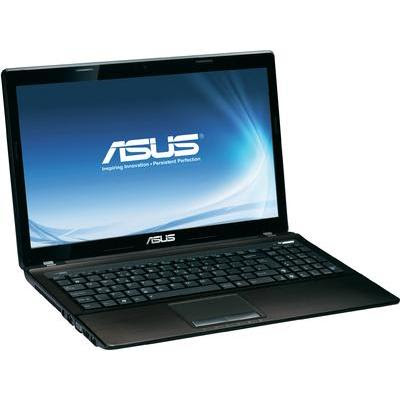
Spesification Asus A53SV :
- Genuine Windows® 7 Ultimate
- Processor: Intel® Core™ i7-2630QM quad-core processor
- Operating System: Genuine Windows® 7 Ultimate
- Memory: DDR3 1333 MHz SDRAM
- Storage: 2.5" SATA
- Optical Drive: Blu-Ray DVD Combo (optional),Super-Multi DVD
- LAN : 10 / 100 / 1000 Base T
- WLAN : Integrated 802.11 b/g/n
- Bluetooth : Built-in Bluetooth™ 2.1+EDR (optional)
- Card Reader : 4-in-1 card reader (SD/ MS/ MS Pro/ MMC)
- Battery : 6cell 5200mAh 56Whrs
Review ASUS B50

Asus has just released a new business portable computer following the design line of all its highly appreciated models coming in black with a stylish mirror finish. Characteristics include a spill-resistant keyboard against 120cc of liquid and built-in LED backlight for low light environments.
Meeting the requirements of business executives in mobile computing, Asus B50 enables high-speed wireless transfers, smart functionalities and reliable features, including a short boot-up time of just 8 seconds via the Express Gate. The latter capability gives the user instant access to the most important applications like web browsing, instant messaging, picture management multimedia player and online gaming.
Running on the Intel Centrino 2 processor technology, the new notebook provides smart power management with low consumption, which leads to an operating time amount of up to 5 hours.
For security, the model comes equipped with biometric technology for fingerprint scanning to allow access to the data stored only to the right users. In addition there is also the Trusted Platform Module for hardware-based encryption and secure login, which is very important during online transactions.
You can use the detachable docking station designed especially for this notebook model to connect all your peripherals and external devices quicker, keeping all your work organized.
The internal configuration includes an Intel Core 2 Duo processor from T9400, P8600, P8400, P7350, T5850 or T5750, the Windows Vista operating system pre-installed, Mobile Intel GM45 Express Chipset, up to 4GB DDR2 memory, Intel GMA X4500HD graphics chipset, a DVD Super-Multi Light Double Layer to burn CDs and DVDs, up to 320GB S-ATA HDD storage, the Intel Wireless Wi-Fi Link 5100, a built-in 1.3MP web camera for video conferences, and an 8-cell battery type.
Asus B50 measures 36.3 x 26.3 x 2.5 - 3.57 cm at a weight of 3Kg with the battery, and sports a 15.4-inch display with Color Shine technology and ASUS Splendid Video Intelligence Technology.
Dell Inspiron 17R 1599MRB Laptop Review Price And Specification

Dell has implemented new laptop which is Dell Inspiron 17R 1599MRB. Dell Inspiron 17R 1599MRB laptop is equipped with many advanced features such as 17.3-inch high screen LCD 1600 x 900 pixel resolution and 32.66 GHz Intel Core i5 480m dual-core processor. Running Windows 7 Home Premium for a new laptop Dell Inspiron 1599MRB 17R supports Microsoft DirectX 10 Dell Inspiron laptop 1599MRB 17R also has a 1.3 megapixel camera.
The Dell Inspiron 1599MRB 17R comes with a price available at $ 849.99. With 16.65 x 11.3 x 1.38 inches in the dimension of the new Dell Inspiron laptop 1599MRB 17R weighs only 6.67 pounds. 6-cell battery for Dell Inspiron 1599MRB 17R provides long hours of battery life.
Dell Inspiron 17R 1599MRB Laptop Specification
- 17.3 inches of high definition LCD display screen
- 1600 x 900 pixel of resolution
- Windows 7 Home Premium operating system
- Intel HD graphics card
- 32.66 GHz Intel Core i5-480M dual core processor
- Wi-Fi (802.11b/g/n) networking
- 6 GB installed RAM
- 640 GB SATA 5400 RPM hard disk drive
- Fast Ethernet (10/100)
- Microsoft DirectX 10
- 8x multi format DVD drive
- 1.3 mega pixel webcam
- Microsoft Office Starter 2010
- Multi-format memory card reader
- 1 eSATA/USB combo port, HDMI port
- SRS Premium Sound enhancement
- 6 cell battery
- 6.67 pounds of weight
- 16.65 x 11.3 x 1.38 inches of dimension
Gigabyte Q2432A notebook Review Spec
Gigabyte Q2432A notebook
The connection to external devices. Or connected to the internet wirelessly GIGABYTE Q2432A notebook is designed to perform well with the ports USB 3.0 Interface for use up to 2 ports allow data transfer to your hard drive External or USB flash drive as fast (faster than USB. 2.0 Interface for 10-fold) the ability to send an HD signal to the LCD Monitor screen outside, it can be done immediately. Through the HDMI port or use the D-sub port, you can do so. And connect to the internet wirelessly via the Wi-Fi (Wireless LAN: 802.11b/g/n) when required to work outside the building with the Bluetooth V3.0 + HS version that supports data transfers of large files. be comfortable. Such as image files. Or video files.
GIGABYTE Q2432A notebook comes with a large 14.0-inch LCD display (LED backlight) widescreen 16:9 aspect ratio and increase the ease of working perfectly. You can also watch movies in HD, it will be GIGABYTE Q2432A notebook supports a maximum resolution of 1366 x 768 pixels and graphics design. Power and entertainment on AMD Radeon Mobility Technology in the HD 6730M and Intel HD Graphics 3000, which will switch functions in relation to the integrity and effectiveness, thus providing GIGABYTE Q2432A notebook. And excellent energy savings.
In addition, GIGABYTE has set the Hot Keys button near the power switch. For maximum efficiency. The operating mode is selected with 4 modes (Power saving, Normal, High performance, dynamic Switch) to fit the work done at that time. And Utility Smart Recovery (F9) to restore the system when the Window is called the GIGABYTE Q2432A notebook out perfect. Response to the current design.


| Gigabyte Q2432A : Specification | |
| Processor | |
| CPU | Intel Core i5-2410M (2.30 GHz, 3 MB L3 Cache, up to 2.90 GHz) |
| Chipset | Mobile Intel HM65 Express Chipset |
| Graphic system | |
| Graphic Chip | AMD Radeon HD 6730M (1GB GDDR5) |
| Display | |
| Type | 14 inch WXGA (1366x768) |
| Main Memory | |
| Memory | 4 GB DDR3 |
| Hard Disk Drive | |
| Hard Disk | 640 GB 5400 RPM |
| Optical Disc Drive | |
| Drive | DVD Writer (Dual Layer Support) |
| Web Camera | |
| Details | 1.3 MPixel |
| Port & Interface | |
| USB2.0 | 1 |
| USB3.0 | 2 |
| Firewire | No |
| DVI | No |
| D-Sub/VGA | Yes |
| e-SATA | No |
| HDMI | Yes |
| Card Reader | 4 in 1 card reader |
| Express Slot | No |
| Finger Print | No |
| Connection | |
| Wireless Lan | 802.11 b/g/n |
| Bluetooth | Yes |
| LAN | Yes |
| Modem | No |
| Battery | |
| Details | Li-ion 6 Cells Battery |
| Weight | |
| Details | 2.40 Kg. |
| Operating System | |
| OS Bundle | DOS Operating System |
| Warranty | |
| Details | 2 Y. |